BLOG

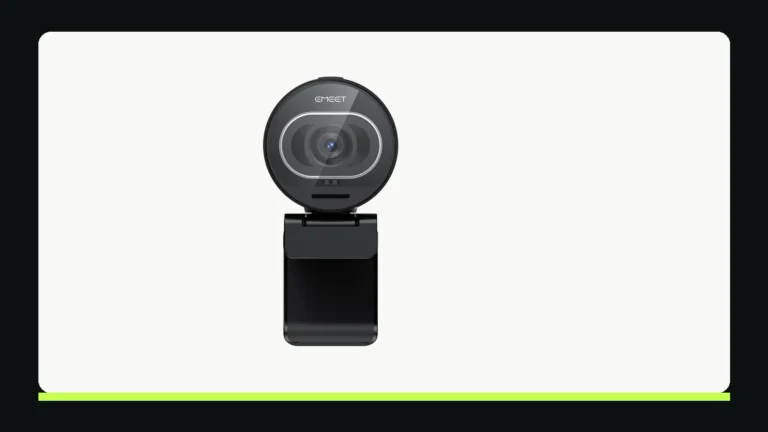
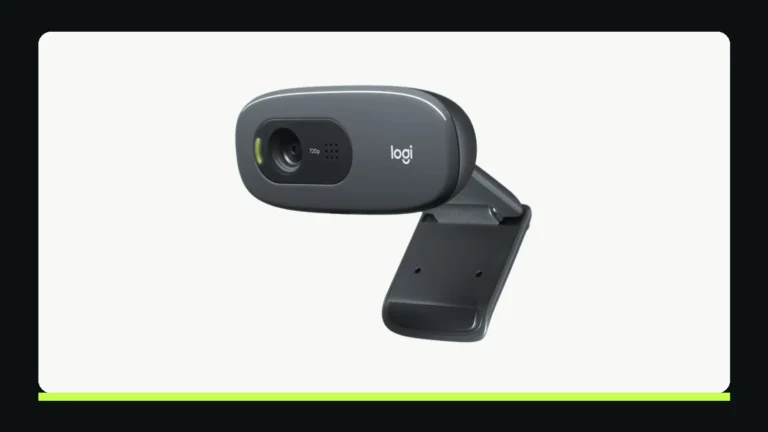
Logitech Brio 100 or EMEET S600? The Brio 100 is the simpler choice for a person who mainly joins Full HD video meetings: it supports 1080p at 30 frames per second, fixed focus, a 58-degree diagonal field of view, an integrated microphone and a physical privacy shutter. The S600 is more useful if you record locally at 4K, show products near the camera or need autofocus and an adjustable field of view. EMEET lists 4K at 30fps and 1080p at 60fps; it does not claim 4K at 60fps for this model.
A better camera specification does not guarantee a better meeting image. Zoom, Meet, Teams and similar services can lower the video resolution sent or received, and light placement, distance and network conditions matter. This comparison uses Logitech’s US Brio 100 page and EMEET’s US S600 page. It is a source-based guide, not a controlled side-by-side camera test.
Brio 100 and S600 at a glance
| Criterion | Logitech Brio 100 | EMEET SmartCam S600 |
|---|---|---|
| Maximum listed mode | 1080p/30fps | 4K/30fps |
| Full HD mode | 1080p/30fps | 1080p/60fps available |
| Focus | Fixed | Autofocus |
| Diagonal field of view | 58 degrees | Adjustable 40–73 degrees |
| Microphone | One built-in mic | Two built-in mics |
| Privacy | Integrated physical shutter | Integrated rotating cover listed by EMEET |
| Likely fit | Stationary individual calls | Local video and face-to-object changes |
These are manufacturer-stated capabilities of the named models. They do not rank real image quality, focus speed or microphone clarity. The exact mode an application uses can depend on its settings, available bandwidth, USB connection and the computer. Check the selected seller package for model suffix and accessories.
What resolution changes in a meeting
Brio 100 provides up to 1920 × 1080 video at 30fps, with a 720p option, over USB-A. For a normal one-person meeting, that is a clear step above the low-resolution laptop cameras that some people still use, provided the room is lit well. Logitech’s product page describes automatic light balancing and a built-in microphone. The camera’s 1080p capability is only one part of the chain: the meeting platform can compress or reduce outgoing video, and the viewer’s connection can reduce what they see.
The S600 offers 3840 × 2160 video at 30fps, plus 1080p at 60fps or 30fps according to EMEET. That extra local resolution can be useful when you record training, product demonstrations or a crop from a wider frame. If your workflow is only live calls that transmit at 1080p or lower, the 4K label alone may produce little benefit for participants. It may also increase processing or storage demands when recording locally.
Do not confuse this S600 with the S600L or another EMEET model. Product pages can group variants or show related devices, and a marketplace headline may omit a suffix. Read the model name on the selected US listing and compare its documented video modes. A claimed 4K/60 figure would need verification from the exact product documentation; the S600 page we checked lists 4K/30.
Focus: stable framing or changing subjects?
Brio 100’s fixed focus is straightforward when you sit at a fairly steady distance in front of a screen. It cannot follow a product you hold close to the lens in the same way an autofocus camera can. Fixed focus may also avoid visible focus hunting during a call, although that should not be taken as proof that its image is always sharper.
EMEET advertises autofocus on the S600. It can help when you alternate between your face and an object, move closer to explain a detail or present something at the desk. Autofocus can also shift unexpectedly when a hand crosses the frame or the light is poor. We have not run a timed, equal-light comparison of its focusing against Brio 100, so we do not claim that it is faster or clearer overall. Test your specific demonstration distance during the return window.
If you hold documents or small products up for clients, make a short recording of the complete action rather than judging one still frame. Move from your normal seated position to the object and back. Check whether text becomes readable and whether focus recovers before you continue speaking. For a permanently stationary call setup, this feature may have little value.
Field of view and what the camera reveals
Logitech specifies a 58-degree diagonal field of view for Brio 100. That narrower frame can help keep a busy room out of view when only one person needs to appear. It can also make it harder to include two people side by side or show a wide workspace without moving the camera farther away.
EMEET describes an adjustable 40- to 73-degree range for S600. A wider angle can include a second person or more of a demonstration table, while a narrower setting can crop the background. Software adjustment may depend on the supported operating system and EMEETLINK version. Do not assume a wider angle is always better; it can expose clutter and place faces near the edge, where framing may look less flattering.
Before purchase, measure how far the webcam will sit from your face. A deep monitor, laptop stand or narrow desk can change the effective framing. You can test the angle with a phone at a comparable position, but a phone lens is not an exact substitute for either webcam. The goal is to decide whether you need a fixed individual frame or flexibility to show the work area.
Lighting often matters more than 4K
The Brio 100 includes Logitech’s RightLight automatic adjustment. Logitech promotes improved brightness relative to its C270 under its own test conditions; that is a manufacturer comparison, not an independent measurement of every home office. A bright window behind you may still turn your face dark. Put a soft light in front or slightly to the side and reduce harsh backlight before judging the camera.
EMEET likewise advertises automatic light correction on the S600. The camera may adjust exposure and color, but those settings cannot create detail that was never illuminated. If a small business owner records a product or teaches on camera, consistent light helps keep skin, paper and product colors easier to see across clips. Choose a stable setup first, then adjust camera software only after observing what is actually wrong.
Do a quick test at the time of day you usually call. Check whether sunlight changes across your face, a monitor provides strange color or overhead lighting creates eye shadows. A 1080p camera in good light can look more useful to a client than a 4K camera under poor light, even though the 4K file contains more pixels.
Microphone: adequate for a quick call, limited by distance
Brio 100 includes a built-in mic; S600 lists two. The number of capsules does not establish which sounds clearer in your room. Both sit near the display rather than near your mouth, so they can capture keyboard clicks, fan noise and reverberation. Manufacturer terms such as “noise-canceling” describe a feature, not a guarantee that the recipient hears no background.
For important client calls, a headset or close-positioned microphone can give you more control over the input. Select it explicitly in the meeting application while leaving the webcam as the video source. Make a sample recording with normal speaking volume and your keyboard in use. Listen for whether the start of sentences is cut off and whether the room sounds hollow. A camera upgrade alone may not solve audio complaints.
If you use the built-in microphone, keep the laptop or monitor at a consistent distance and reduce competing noise at its source. A colleague’s voice in the same room may be difficult to suppress reliably. Avoid claiming either webcam’s microphone is superior without a level-matched, same-room comparison, which was not part of this research.
Privacy, connection and setup
Logitech builds a physical shutter into the Brio 100. Closing it blocks the lens regardless of application settings, although the microphone remains a separate device and should be managed separately. Logitech lists USB-A plug-and-play use and a cable of about 1.5m. If your PC is far from the display or has only USB-C ports, check cable reach and whether a suitable adapter or hub is needed.
EMEET’s S600 product documentation describes a rotating privacy cover and USB plug-and-play connection. Confirm the exact bundle if a tripod is important: the US page offers S600 and S600-with-tripod selections. A mounting clip, tripod thread, included cable and stand are distinct items. The presence of a product photograph with a tripod should not be read as proof that the base variant includes one.
Place either camera near eye level, check that the clip is secure without obstructing part of the screen, then allow camera permission in the operating system and meeting app. Select the device by name, verify the outgoing preview and test the privacy cover. For EMEETLINK or firmware updates, use the official EMEET channel and the instructions for S600, not a utility for S600L. Plug-and-play video can work even if optional controls are unavailable on a given computer.
How independent experiences should be used
Public Brio 100 comments include people satisfied with a basic call camera and isolated reports of software or image problems. Public S600 discussions similarly include positive streaming experiences and occasional configuration trouble. These are individual accounts with different computers, lighting and applications. They cannot establish a defect rate, an average video score or a controlled Brio-versus-S600 winner.
If you see a report that a camera works in Zoom but displays a green frame in another app, treat it as a prompt to check application and operating-system compatibility, not proof that all units are faulty. If another user praises the S600’s image, note whether they used EMEETLINK, local recording, favorable light or a different model suffix. Reviews are useful for identifying questions to test in your own setup.
Which one fits your work?
Choose Brio 100 if your main task is one-person video meetings, you want predictable 1080p/30 output, prefer a physical shutter and do not need autofocus. Fixed focus and a narrower view can suit a stable monitor position. Its simple USB-A setup is a practical advantage if your computer has a suitable port and the selected software supports the functions you need.
Consider S600 if you record locally in 4K, value 1080p/60, switch between face and objects or need adjustable framing. Its added features are useful only if you will use them and your computer, app and lighting support the workflow. Confirm the exact S600 package and its tripod or mount contents before ordering.
For a small team, standardization may matter more than maximum resolution. List which computers have USB-A, which call apps are mandatory, whether a company policy permits vendor software and whether one consistent framing angle suits every desk. A small pilot with one real workstation can expose problems before buying several cameras; this article does not claim to have run such a pilot.
Frequently asked questions
Does Brio 100 do 60fps?
The specifications reviewed here list 1080p at 30fps and 720p at 30fps. Do not transfer a 60fps claim from another Brio model to the Brio 100.
Does the S600 record 4K at 60fps?
No such mode appears on the official S600 page we checked. It lists 4K/30fps and 1080p/60fps as different modes.
Will colleagues see 4K in a video call?
Not necessarily. The meeting platform, its settings, network conditions and the recipient’s device can lower transmitted or displayed quality. 4K is easier to justify for local recording or reframing.
Which has the better microphone?
We cannot declare a winner without a same-room, level-matched test. If voice quality matters to your work, test a headset or close microphone before relying on a webcam’s distant mic.
Verdict
Brio 100 is the straightforward Full HD meeting webcam: fixed focus, 58-degree framing, physical shutter and 1080p/30. S600 adds verified 4K/30, 1080p/60, autofocus and adjustable 40–73-degree framing. The S600 is more versatile for local recording and show-and-tell work, while Brio 100 covers a simpler call setup. Choose from the actual task, light, computer and exact US package rather than assuming 4K alone will improve every meeting.