BLOG

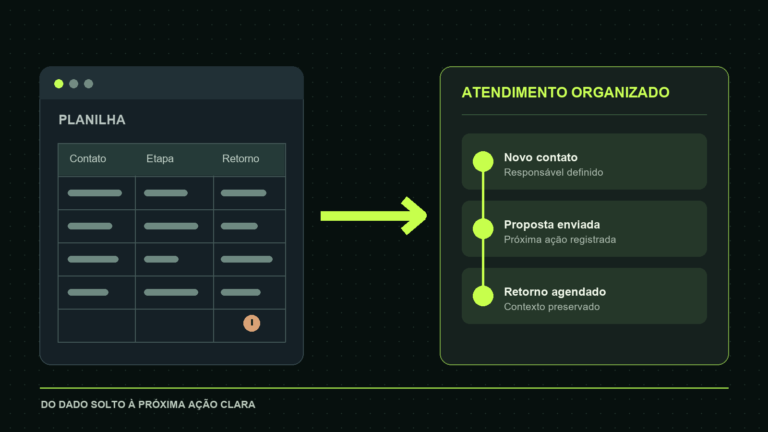
Sales service automation should preserve a lead’s context from the first form or message to the proposal and follow-up. The useful question is not “How many messages can a bot send?” but “Can the right person respond with the right information before the opportunity goes cold?” Start with contact capture, ownership, and a clear next action. The nine workflows below are patterns to test in your own CRM, not promised conversion results.
Where automation can help a small sales team
| Stage | Useful automation | Failure to prevent |
|---|---|---|
| Intake | Capture form and match an existing contact | Duplicate or missing lead |
| Routing | Assign an owner by service or region | Unowned inquiry |
| Response | Prepare a relevant first reply | Generic or unauthorized promise |
| Follow-up | Create a task by stage | Repeated or unwanted contact |
| Measurement | Record source and response time | Misleading attribution |
Write the current journey on one page: where contacts arrive, what staff ask, where records live, and who can make a proposal. Then automate one transition at a time. A flow that moves data quickly into the wrong record is worse than a slower, reviewable manual step.
1. Capture a website lead in the CRM
When a form is submitted, validate required fields and check whether the email or another approved unique identifier already belongs to a contact. Update an existing record or create a new one according to the CRM’s rules. Store the source page, service requested, consent information, and submission time. If the API fails, put the event in a retry queue rather than silently dropping it or creating a second record.
HubSpot’s form automation documentation shows possible follow-up actions and notes that contacts may re-enter a workflow on each submission. Its deduplication guide illustrates why email matching and record IDs require careful configuration. Apply the equivalent rules to whichever CRM you use.
2. Classify origin and intent
Keep the original source—website form, landing page, campaign, referral, or incoming message—separate from the service the person asks about. A lead may arrive from an ad for one service and ask about another. Use fields that staff can correct. Do not infer income, urgency, or customer value from a short message without a valid business reason and review process.
Classify only as much as routing needs. For example, a small web agency may distinguish new site, maintenance, automation, and general support. When the message is ambiguous, assign it to human triage instead of forcing a possibly wrong label.
3. Draft a first reply for approval
A workflow can prepare a response using the submitted service, location, and customer question. A salesperson should check the scope and send it when the deal requires judgment. Keep price, deadlines, availability, and guarantees out of a generated draft unless approved data supports them. A fast inaccurate promise creates more repair work than a measured first response.
For simple acknowledgments, an automatic message can confirm receipt and state when a person will reply. Do not pretend a proposal has been reviewed. Test that the reply goes to the right contact and respects channel and consent rules.
4. Assign the lead to an owner
Route by service, territory, existing account owner, or available staff, with a default monitored queue. Record who accepted the lead and when. HubSpot’s ownership documentation shows workflow-based assignment but also notes subscription conditions; confirm your CRM’s current plan. Assignment without notification or acceptance can leave a lead stranded.
Define what happens if an owner is out, leaves the company, or does not act within the target time. Reassign or escalate with a visible audit trail. Avoid a round-robin rule that overrides an established customer relationship without warning.
5. Create follow-up tasks by sales stage
A submitted form, held discovery call, proposal sent, and unanswered proposal need different next steps. Create a task for the owner with due date and context, then stop or adjust it when the customer replies. Do not send the same follow-up repeatedly because two tools recorded the same event. Use a stable opportunity ID and retry-safe logic.
Ask whether the contact agreed to the channel and whether the message is useful. A reminder to review a proposal is different from an unsolicited marketing sequence. Staff should be able to pause or edit the cadence.
6. Build a pre-proposal checklist
Before quoting, verify scope, budget range if volunteered, deadline, decision maker, required integrations, and materials the customer can provide. An automation can flag missing fields and request clarification, but should not fill unknowns with invented requirements. Keep assumptions visible in the proposal and define who approves exceptions.
7. Synchronize WhatsApp, forms, and CRM
A customer may fill a form and then message the business. Match channels to the same person using authorized identifiers and staff review when matches are uncertain. Preserve the sequence of events and the latest customer request. Do not merge two people simply because they share a phone or company name.
Keep the CRM as the operational record while messaging tools deliver conversation. Document which system owns status, contact details, and consent. On integration failure, create a visible exception queue. Reconciliation is more reliable than assuming every webhook arrives once and in order.
8. Alert on stalled or unowned leads
Alert the sales lead when a new inquiry has no owner or an accepted opportunity has no next action. Set thresholds that match business hours and type of request. A generic alert for every unchanged record creates noise. Include the record ID, last customer action, owner, and reason for the alert so the recipient can act immediately.
9. Measure response and outcome by source
Track first useful response, owner acceptance, discovery meetings, proposals, won deals, and reasons for loss by source. Compare similar periods and lead types. If a source sends many unqualified contacts, a raw conversion rate may need context. Keep campaign tags and form names stable so changes in naming do not appear as changes in demand.
Review errors alongside results: duplicates, failed webhooks, unanswered messages, and incorrect routing. An automation can improve the apparent speed metric while losing leads in an exception queue. A weekly review with the sales team will reveal that gap.
Run a narrow commercial test
Choose one lead source and one service. Submit test forms for a new contact, an existing contact, missing information, and an API failure. Confirm the right record, owner, task, notification, and recovery. Then run a controlled live pilot with staff monitoring. Record the baseline and decide in advance what success and unacceptable error look like.
Protect customer data by limiting fields, access, retention, and tool permissions. Keep consent and channel preferences visible. When using AI for drafts or classification, review what data is sent to the provider and how it can be deleted or exported. The salesperson owns the relationship even when software prepares the next step.
A worked example for a service business
Imagine a web studio receiving requests through a “new website” form. A submission arrives with name, email, service, and a short description. The integration checks the CRM for the email, records the original page and time, and creates or updates a contact. A routing rule assigns the website specialist, who receives a task with the customer’s words. The system sends only an acknowledgment, not a price quote.
If the customer messages again through an authorized channel, the specialist sees both events on the same record. If CRM lookup fails, the submission stays in a protected exception queue and the team gets an alert; the workflow does not create a second contact on every retry. After the discovery call, the owner records the next step and approves any proposal. This example illustrates a design pattern, not a measured result from a real deployment.
Frequently asked questions
Does sales automation replace a salesperson? It can remove repetitive transitions, but people still qualify complex needs, negotiate, and approve promises.
Do I need a CRM first? You need one reliable place for ownership and status. A small team can start simply, but scattered sheets and inboxes make safe automation harder.
Can WhatsApp replies be fully automatic? Simple approved acknowledgments may be appropriate; verify the official channel’s rules and keep human review for offers and exceptions.
Which workflow comes first? Capture and assign an incoming lead reliably. Later automations depend on that record being correct.