BLOG

Is the Dell KM3322W keyboard-and-mouse combo worth buying for work? It can equip a basic desk with a full-size keyboard, a three-button mouse and one shared USB receiver. The US English version is convenient when you want replaceable batteries and do not need to switch among several computers. The case is weaker if you want a compact keyboard, extra mouse buttons, a particular typing feel or Bluetooth pairing.
This US edition focuses on Dell’s KM3322W US English listing, Dell part 580-AKCW, and the manufacturer’s user guide. The Portuguese original assessed a Brazilian ABNT2 package, Dell part 580-BBBB. The model family is shared, but the keyboard legends and layout are not. Do not use a Brazilian product title or generic catalog photo to identify the US key arrangement.
The KM3322W in one table
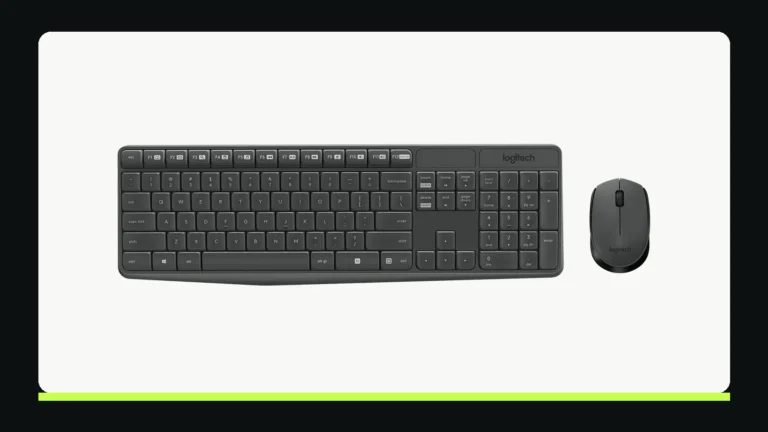
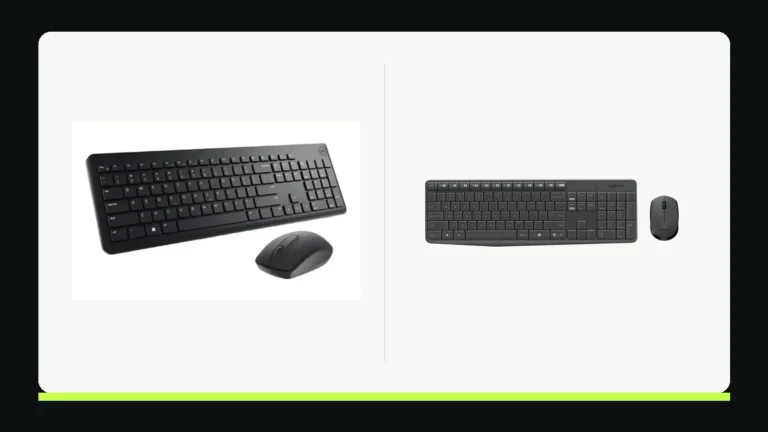
The kit uses a 2.4 GHz wireless USB receiver shared by its keyboard and mouse. Dell’s US page lists a full-size keyboard with a number pad, multimedia controls and two AAA batteries, plus an optical mouse with three buttons, a 1,000 DPI specification and one AA battery. These numbers describe the product, not measured typing speed, acoustic performance or endurance in our hands.
| Feature | US English KM3322W | Practical consideration |
|---|---|---|
| Layout | US English, full size with number pad | Check key legends before ordering |
| Connection | 2.4 GHz, shared nano USB receiver | One available USB port; not direct Bluetooth |
| Keyboard power | Two AAA batteries | Replaceable; runtime varies with use |
| Mouse power | One AA battery | Check battery level before diagnosing input trouble |
| Mouse | Optical, three buttons, 1,000 DPI | Basic navigation without side shortcuts |
| Keyboard width | About 17.6 inches | Reserve desk space beside the mouse |
| Software | Dell Peripheral Manager listed for Windows | Check current requirements for optional settings |
Dell’s US listing has included the AA and two AAA batteries, but verify the current package before checkout, particularly if it is open-box or sold by a third party. The US page also describes three years of Advanced Exchange Service for its listed package. That is a product-specific service claim; confirm eligibility, seller condition and applicable terms on the exact order.
The correct layout is a purchase requirement
A KM3322W label does not by itself tell you which regional keyboard is inside the box. The Brazilian ABNT2 model has a different key arrangement and legends from the US English version. If your work depends on US punctuation placement, shortcuts or a familiar programming layout, select an explicitly US English package. If you need accented Portuguese typing with ABNT2 physical keys, the US listing is not a substitute merely because the operating system can change its language.
Read the variant selector and part number, not only the first product photo. A marketplace can reuse an image across regional offers. The box and order details should agree with the layout you selected. On receipt, inspect the physical Enter, Shift, punctuation and number-pad layout before the return period closes. A software keyboard setting cannot add or relocate a physical key; it only changes how keystrokes are interpreted.
The full-size board measures approximately 444.9 mm across, or about 17.6 inches. Put that measurement next to your current keyboard and reserve enough area for mouse movement. A number pad is helpful for repeated figures in spreadsheets, accounting or customer records, but it pushes the mouse farther to the side on a narrow desk. If you rarely use the number pad, a smaller keyboard may improve the arrangement more than the price of a bundle does.
One receiver: convenient but not multi-device
Dell’s KM3322W guide describes the keyboard and mouse connecting through their paired USB receiver. Both occupy one computer port together, which simplifies a basic desk. It does not mean you can pair them directly over Bluetooth, connect to multiple computers simultaneously or replace the receiver with any Dell USB dongle. If you expect to move between a desktop and laptop many times daily, evaluate a kit expressly designed for device switching.
Keep the receiver identified with the kit if you manage several desks. Mixing receivers or losing one can create unnecessary support work. For a laptop with only USB-C ports, account for a compatible adapter or dock. The fact that an adapter has a USB port does not guarantee every wireless device behaves equally in its placement; if you see dropouts, try the receiver directly in the computer when possible as part of diagnosis.
Dell’s troubleshooting guidance recommends checking batteries and receiver connection when the peripherals stop responding. A low battery, a loose USB connection, interference or a problematic hub can resemble a hardware failure. Test the simple path first: fresh batteries, a direct port and a short distance to the receiver. Do not assume every issue is wireless interference, but do not discard the kit before checking the setup it depends on.
The claimed wireless range is up to 10 m under manufacturer conditions. That is not a guarantee in every office, particularly around metal desks, cabinets, other 2.4 GHz equipment or a receiver hidden behind a desktop tower. For normal desk use, place the receiver where it has a workable path and test the keyboard and mouse at the distance you actually use. A range claim is less important than stable operation at your seat.
Is the keyboard suitable for long writing or coding?
The KM3322W is a full-size board with number pad, tilt legs and multimedia functions. Dell describes a plunger key mechanism for the US version. Those facts do not establish that it will feel like a mechanical keyboard, be silent or suit every long writing session. Key feel depends on travel, resistance, noise, spacing and individual preference. If you already know you need a particular switch or a compact arrangement, buying a basic combo for convenience may be the wrong economy.
The US key layout can suit coding when its punctuation and shortcuts match your muscle memory. But there is no feature that makes this model faster at programming. Try the commands you use often, including brackets and navigation keys, and see whether the mouse position is comfortable with the number pad in place. A keyboard can be entirely functional yet still make you reach farther across the desk than you prefer.
Dell’s marketing mentions spill resistance and anti-fading keycaps on a US listing. Those terms should be read within the manufacturer’s product description; they do not promise that a spill cannot damage the device or that markings never wear. Keep liquids away from electronics and consult the warranty terms if a problem occurs. We did not test keycap wear, liquid exposure or sound pressure.
The included mouse is deliberately basic
Dell lists a three-button optical mouse: left, right and a clickable scroll wheel. The published resolution is 1,000 DPI. This suits conventional pointer movement and navigation, but it does not provide side buttons for browser history or workflow shortcuts. If those commands are central to your work, compare the cost of a separate mouse with the bundle price rather than assuming the combination covers every need.
The mouse measures about 104.9 × 58.3 × 38.9 mm. Dell lists a starting weight of approximately 57.8 g, but a measurement without the same battery conditions is not directly comparable with another mouse’s advertised mass. More importantly, weight alone cannot predict hand comfort. Check whether you can reach the wheel and buttons without squeezing, and whether the body supports your usual grip for the length of a work session.
For design details, large displays or gaming, the 1,000 DPI number is not a guarantee of precision or competitive performance. It simply describes a movement setting. A user who likes the keyboard but dislikes the mouse may end up paying for a second mouse anyway. That is an important reason to judge the kit as two products, not one purchase label.
Batteries, runtime and support
The US specifications list two AAA batteries for the keyboard and one AA for the mouse. Dell advertises up to 36 months of keyboard runtime; its product material has also stated an up-to-18-month mouse figure. These are manufacturer estimates under particular usage assumptions, not our measurements or guaranteed replacement dates. Actual life depends on how frequently you use the devices, the batteries selected and storage conditions.
Replaceable batteries make it simple to restore power without parking the keyboard or mouse near a charging cable. They also create a small recurring supply task. Keep the correct battery sizes available, especially for a team with several desks. When a device becomes intermittent, check power before investigating the receiver or replacing the peripheral. If you use rechargeable AA or AAA cells, confirm their behavior in the device rather than assuming the advertised runtime will match disposable cells.
Dell’s US listing describes three years of Advanced Exchange Service for the applicable product. Confirm the service tag or order documentation and its exact terms at purchase, especially for marketplace, refurbished or bundled units. A retailer return window, manufacturer service and any statutory rights are separate mechanisms. Do not infer the same support from a generic third-party title.
What three customer accounts can and cannot tell us
In a Walmart page collecting KM3322W reviews, a reviewer named Jay described appreciating the absence of cables in an employee’s work area. That is a concrete desk-organization benefit. It does not establish quicker typing or higher productivity. Another reviewer, David J, reported the mouse scroll wheel becoming erratic after months despite liking the initial use. A third, brizeida, described a kit stopping after around five months and a difficult exchange experience with that seller.
These are individual accounts in a collective page, not a controlled durability study. They do not give the rate at which wheels fail or predict the life of a new unit. The reviews may also represent different batches or retail conditions. Their useful lesson is to test both the keyboard and mouse and keep a clear route to retailer or Dell support. A bundle can be disappointing if either half becomes unusable.
The US reviewer context is relevant to the US English adaptation, but still cannot prove that every US package has identical construction. We have not inspected any customer’s order. Distinguish a specific complaint from a product-wide diagnosis, and distinguish a seller’s exchange process from the underlying hardware. This prevents a few strong anecdotes from becoming a fabricated reliability statistic.
When a different kit or separate components make sense
Compare the KM3322W with another full-size wireless kit if the decision is mainly price, physical layout or receiver convenience. A number pad and media shortcuts are common; neither is exclusive to Dell. If quiet typing is your main requirement, seek a review that actually evaluates sound on the exact model. Low-profile-looking keys are not evidence of low noise.
Choose a multi-device keyboard and mouse if you frequently change between laptop, tablet and desktop without moving a USB receiver. Choose pieces separately if you have a clear preference for a compact board, mechanical switches, an ergonomic mouse or side-button shortcuts. The combo is good value only when you want both components in their included form.
For a managed office, verify whether your IT policy permits USB wireless receivers and optional software. Dell Peripheral Manager appears on the US listing as Windows software, but basic 2.4 GHz input and optional settings are separate questions. Check current supported versions rather than using a historical compatibility line as proof of a particular advanced function.
US buying checklist
- Confirm the offer explicitly says KM3322W US English, with the intended part number and key legends.
- Measure about 17.6 inches of keyboard width plus mouse travel on your desk.
- Check for an available USB port or include a suitable USB-C adapter.
- Verify the shared receiver and battery contents of the exact package.
- Decide whether a three-button mouse meets your work needs.
- Compare the complete delivered price and seller condition, not an older or regional quote.
- Read Dell and retailer support terms for the offered unit.
- On arrival, test every key, mouse click and scroll-wheel action within the return window.
Frequently asked questions
Does the KM3322W connect by Bluetooth?
The documented combo uses a 2.4 GHz USB receiver. Do not count on direct Bluetooth pairing or effortless multi-device switching.
Does every KM3322W have a US English layout?
No. Regional versions exist, including a Brazilian ABNT2 package. Confirm the variant and physical key arrangement on the exact listing.
Is the keyboard silent?
We did not measure its sound and the cited manufacturer specifications do not establish silent operation. Try the exact unit if sound is a purchase requirement.
Is it useful for programming?
It can be if the US layout, full-size footprint and basic mouse fit your preferences. No measured coding advantage is established.
Verdict
The US English KM3322W is a practical basic workstation bundle when the full-size keyboard, three-button mouse, one shared receiver and replaceable batteries match your needs. It is less convincing if you want special typing feel, quietness proven by a test, mouse shortcuts or frequent switching between computers. Verify the regional package and assess both devices before calling the kit good value.